Brighten dark scenes without washing out the picture
Many shows are graded for a dark room and a big TV, so on a laptop their night scenes sink into black. Filmina's free Shadow Lift look opens the shadows up again, while black stays black and bright lights keep their detail, on Netflix, YouTube and any other site that plays video.
Free on every plan. No account, nothing uploaded. Chrome, Edge and Brave; Firefox in beta.
Try it on a dark hall
Pick Shadow Lift and watch the machinery come out of the dark while the lit machine keeps its glow. Then try the Brightness slider on the original to see why a curve does better.
Now showing Original
Video: Tears of Steel (© 2012 Blender Foundation), licensed CC BY 3.0; Tears of Steel cropped to 16:9. Graded in your browser by the extension's own renderer; nothing is uploaded.
What lifts a dark scene, and what doesn't
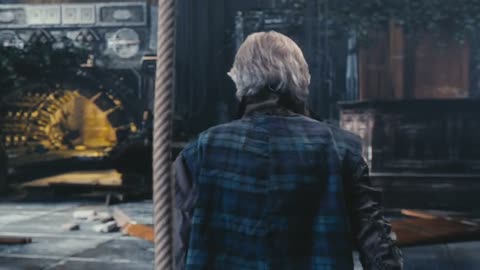
The same frame, drawn by the extension's shader three ways.
Before
Original
The machinery and the floor sink toward black, and the man is mostly silhouette.
-
Free · the fix
Shadow Lift
A curve lifts the shadows most and the highlights least: black stays black and the lit machine keeps its glow.
-
Not for dark scenes
High Contrast
More contrast pushes shadow detail further into black. High Contrast is for low-vision viewing of well-lit scenes.
Why dark scenes look too dark
Finished for a dark room
Many shows are graded for a big HDR TV with the lights off. On a laptop, or in a lit room, the bottom of the picture sinks into black.
Brightness glares first
Brightness lifts everything by the same proportion, so lamps and faces glare before the shadows open. On the hall above, Brightness +25 lifts the darkest quarter of the picture by half and blows out 6% of the frame; Shadow Lift lifts it by four-fifths and blows out none.
Only what is there
Streaming keeps the least detail in the darkest parts of the picture. Shadow Lift shows what survived; it cannot invent what the stream left out.
Turn it on in three steps
-
Add Filmina to Chrome
It is free and needs no account. Edge and Brave work too.
-
Show the rail on a video
Play something, click the Filmina icon in the toolbar and press Show rail, or press Alt+Shift+S. The rail sits beside the player.
-
Pick Shadow Lift
Open Looks, choose Comfort and tap Shadow Lift. For a little more, raise Brightness in Tune; for less, turn the look's Amount down.
Questions
About dark scenes
- Often because the show was finished for a big HDR TV in a dark room. On a laptop, or with the lights on, the darkest part of the picture sinks into black. Filmina's free Shadow Lift look opens those shadows up again, on Netflix and any other site.
- Add Filmina, show the rail on the video, then open Looks, choose Comfort and tap Shadow Lift. For a little more, raise Brightness in Tune; for less, turn the look's Amount down.
- Brightness lifts everything by the same proportion, so lamps, windows and faces glare before the shadows open up. Shadow Lift raises the shadows most and the highlights least, and leaves true black where it is.
- Yes. Shadow Lift is a curve, and both of Filmina's renderers draw curves, so it works on protected video too.
- Less than brightness does: the curve keeps black where it is and barely moves the brightest parts. On a scene that was not dark to begin with it can look flat, so turn it off when the lights come back up.
- Yes. Shadow Lift is free on every plan, like every comfort look, with no weekly limit and no account.
More ways to watch comfortably
- Colorblind filter Deuteranopia, Protanopia and Tritanopia corrections for Netflix, YouTube and any other video.
- Night mode for videos Dim and warm the picture itself, not just the page, and dim the page around it like a cinema.
- Every look, side by side All of Filmina's looks on the same frame, the comfort set among them.
See what's in the shadows.
Add Filmina free. Shadow Lift is never behind a paywall, and nothing you watch leaves your device.